Watch & Install
Full Installation Video (Step-by-Step)
Prefer watching over reading? This short video walks through every step below — download, run the setup file and go.

Setup Guide
Follow These Steps After Downloading
The whole setup takes less than 2 minutes. No technical knowledge needed — just download both files, run the Setup File and enter your store name.
2 files to download
One-click auto install
Windows 10, 11 & above
Manual inside ZIP (Hindi + English)
No internet needed after setup
1
Download
Download Both Files
Click the two Download buttons above — the BoutiqueOS ZIP and the Setup File. Save both in the same folder (your Downloads folder is fine).
2
Run
Run the
Setup_BoutiqueOS File
Double-click the Setup File you just downloaded. If Windows shows a blue warning screen, click "More info" → "Run anyway" — see the Windows Defender box below.
3
Store Name
Type in Your Store Name
A setup window will open and ask for your store name. Type it in exactly as you want it to appear inside the app.
You'll see →
4
Done!
Click Install — You're Done!
Click "Install". BoutiqueOS sets itself up automatically and adds a shortcut to your Desktop — no extracting, no folders to find. Just open the shortcut and start using BoutiqueOS.
🛡️
Windows Defender Warning? Do This
When you run the Setup File (or BoutiqueOS) for the first time, Windows may show a blue "Windows protected your PC" screen. This is normal for new software that is not yet registered with Microsoft. BoutiqueOS is completely safe — follow these steps to allow it:
1
On the blue warning screen, click "More info" (small link below the main message).
2
A "Run anyway" button will appear at the bottom. Click it.
3
BoutiqueOS will launch normally. Windows will remember your choice — you will not see this warning again for this app.
⚠️
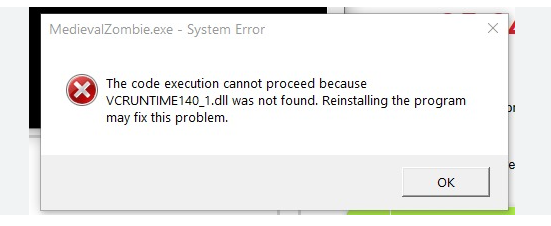
DLL Error / VCRUNTIME Missing? Run the VC Installer
On some computers you may see an error like "VCRUNTIME140.dll was not found" or "MSVCP140.dll missing" when trying to open BoutiqueOS. This means your computer is missing the Microsoft Visual C++ Runtime — a free system package that BoutiqueOS (and most Windows software) needs to run. It is safe and official from Microsoft.
1
Open the folder where BoutiqueOS was installed. Look for a file named vc_redist.x64.exe (it is included there).
2
Double-click it and click "Install". It takes about 30 seconds to complete.
3
Once installed, restart your computer once and then launch BoutiqueOS again — the error will be gone.

Mobile App (PWA)
Use BoutiqueOS on Your Phone
No app store needed. Add the BoutiqueOS web dashboard to your home screen as a native-feeling app — works on both Android and iPhone.
Use Google Chrome for best results. Steps may look slightly different on Samsung Internet or other browsers.
1
Open
Open Chrome & Go to Dashboard
Open Google Chrome on your Android phone. Type boutiqueos.in/dashboard in the address bar and open the page. Log in with your BoutiqueOS account.
2
Menu
Tap the Three-Dot Menu
Tap the three-dot icon in the top-right corner of Chrome to open the browser menu.
Tap this →
top-right corner in Chrome
3
Install
Tap "Add to Home Screen"
From the menu, tap "Add to Home Screen" or "Install app". A pop-up will appear — keep the name as "BoutiqueOS" and confirm.
Look for →
4
Done!
Tap Add — App is Ready!
Tap "Add" to confirm. BoutiqueOS will appear on your home screen just like any other app — tap it anytime for instant one-tap access to your dashboard.
Need Help Setting It Up?
We set up BoutiqueOS on your computer for you — for free. Just fill in your details and we will call you within a few hours.